

If you’ve ever sold products on Amazon or even just shopped there, you’ve probably encountered an ASIN without even realizing it.
What might initially seem like a random string of letters and numbers is actually the backbone of Amazon’s entire product catalog, and understanding it as a seller can save you time, money, and headaches.
So whether you’re managing shipping costs, dealing with inventory fees, or just trying to make sense of your Amazon seller dashboard, the ASIN is where it all begins.
What is an ASIN?
ASIN stands for Amazon Standard Identification Number, which is a unique 10-character code that’s assigned to every single product in Amazon’s marketplace.
Think of this like a digital fingerprint for everything sold on Amazon.
No two products share the same ASIN. Most ASINs are alphanumeric codes starting with B0, and you can find the ASIN in several places, like in the product page URL:
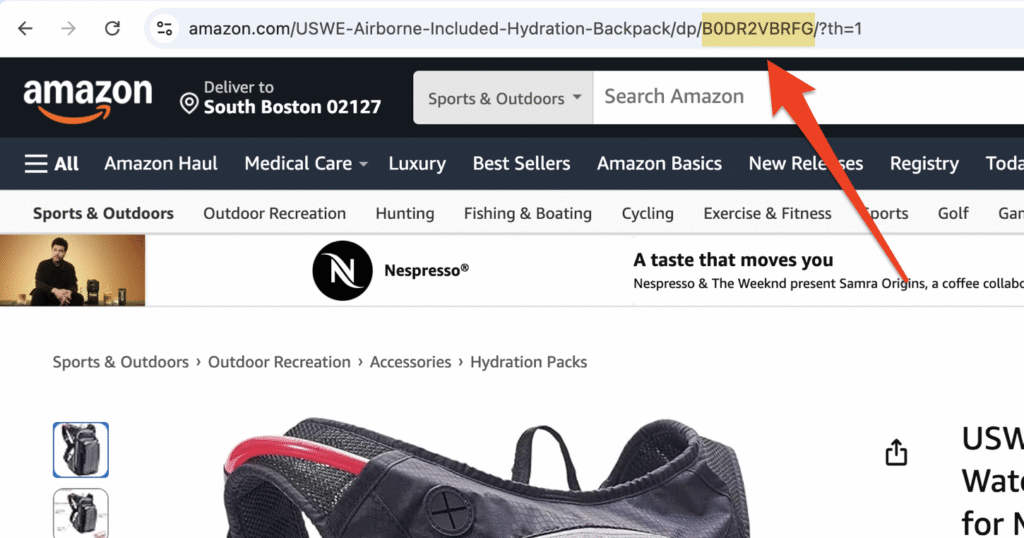
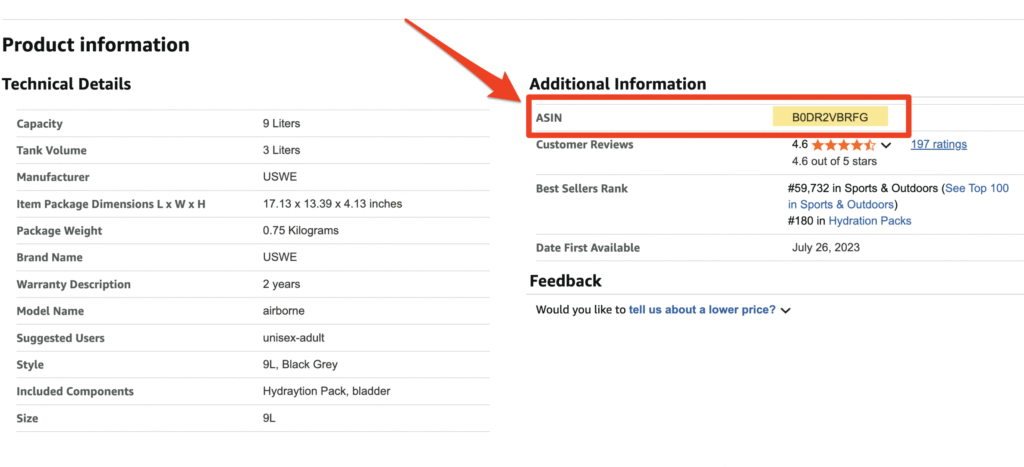
For this particular item I’m browsing for (a hydration backpack), the ASIN is B0DR2VBRFG.
And you’ll see this again if you scroll to the Product Information portion of a listing:
It’s worth noting that Amazon handles things a bit differently if you’re selling books. Physical paperback and hardcover books don’t always have a completely new identifier. Instead, Amazon uses the ISBN (International Standard Book Number) as the ASIN.
But if the same book is available as a Kindle ebook, then Amazon assigns a completely new ASIN starting with “B0” instead of the ISBN (meaning a single book title can have multiple ASINs depending on the format).
For everything else, from electronics to pet supplies and clothing, Amazon generates a completely unique code as the ASIN.
Why ASINs Matter More than You Think
At first glance, the ASIN on your product listings might just seem like another piece of administrative data. But if you’re selling on Amazon, especially if you’re dealing with Fulfillment by Amazon (FBA), this code matters a lot more than you might realize.
Here’s why.
Every product you ship to Amazon’s warehouse needs to be tracked. And every storage fee, long-term storage charge, and fulfillment fee is calculated based on whatever you’re storing and shipping.
And how does Amazon track those products? The ASIN.
So when you’re analyzing your shipping fees associated with Amazon, your ASINs become crucial reference points. They help you trace exactly where your money is going.
Is one particular product the culprit of your storage fees? Are certain ASINs getting hit with unexpected fulfillment charges and overages? You can’t answer these questions without understanding the ASIN system.
How Amazon Creates and Assigns ASINs
Whenever you list a product on Amazon for the first time, the platform automatically checks to see if it already exists in its catalog.
Amazon looks at all the identifiers you provide about the product (like a UPC, EAN, or ISBN), and if it finds a match, your product gets linked to the existing ASIN.
This means that you’ll share a product page with other sellers offering the same exact item. You’re still competing on price, fulfillment speed, seller rating, etc., but the core product information stays the same.
If your product doesn’t already exist in Amazon’s system yet, congratulations — you get to create a brand new ASIN.
You’ll need to provide detailed product information like:
- Product title
- Brand name
- Manufacturer details
- Descriptions
- Images
- At least one globally recognized product identifier
Once Amazon verifies everything, it generates a new ASIN and your product officially enters the catalog.
This process matters because errors here can lead to serious problems down the road. If your product is listed under the wrong ASIN, it can lead to inventory mix-ups, incorrect fee calculations, customer complaints, and more.
If you look through Reddit, Amazon Seller Central, and other forums, you’ll find them filled with sellers talking about issues related to the wrong ASIN:
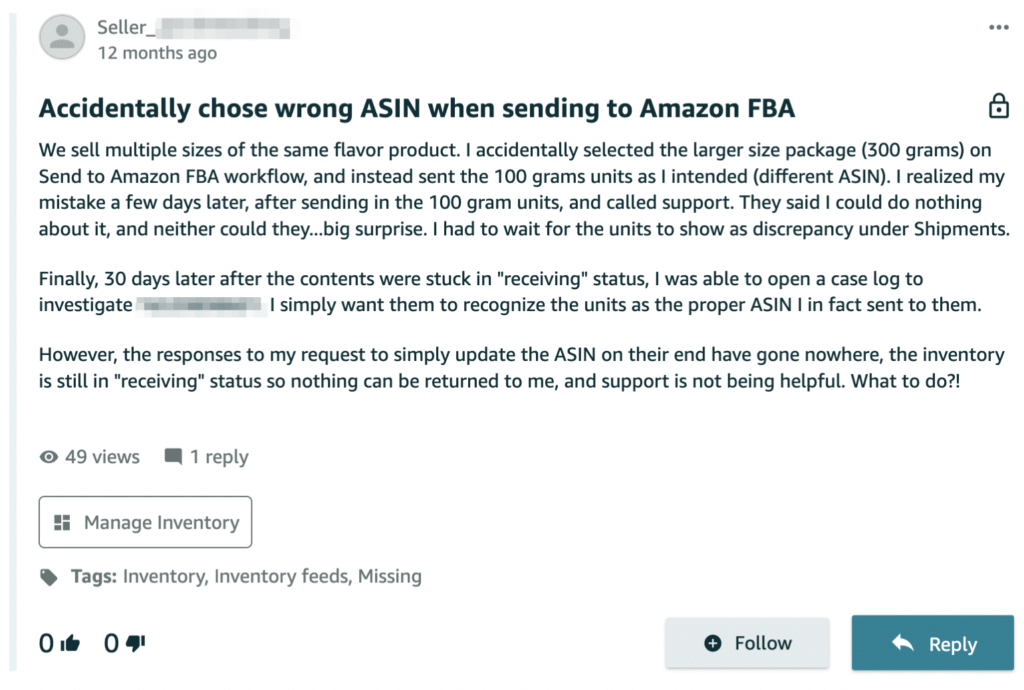
We’ve seen businesses pay thousands in unnecessary fees simply because products were assigned to duplicate or incorrect ASINs.
And these types of mistakes can easily be avoided.
ASINs vs. Other Product Codes For Sellers
Though it may seem like it at times, Amazon doesn’t operate in isolation. So if you’re selling on your own website or other platforms, you need to understand the differences between ASINs and other product identification systems.
Here are other codes that you need to get familiar with to help you manage your business more effectively:
- UPC (Universal Product Code): This is the barcode you see on most products in stores. It’s recognized worldwide and managed by GS1, a global standards organization. In the US, the UPC is a standard retail identifier. And when you create a new Amazon, you’ll typically need a UPC to get started.
- EAN (European Article Number): Think of this as the European version of a UPC. It’s more commonly used internationally but serves the same purpose as a UPC (uniquely identifying products across different retail systems).
- ISBN (International Standard Book Number): Used exclusively for books and publications. If you’re selling books on Amazon, the ISBN automatically becomes your ASIN (except for Kindle books).
- SKU (Stock Keeping Unit): This one is a bit different. While Amazon assigns ASINs, you assign the SKU. SKUs are internal tracking codes for inventory, product variations (like size and color), managing stock across multiple locations, and more.
Understanding these differences matters when you’re dealing with different seller fees.
Amazon calculates a bunch of different charges like storage fees, removal fees, and disposal fees, based on the ASIN. But your internal cost tracking might rely on SKUs. So connecting the two systems can help you see the big picture of what each product actually costs you to sell.
Understanding Product Variations and Parent-Child ASINs
Things get a little more complex when you sell products with variations. I’m referring to products with different colors, sizes, styles, or configurations. While you might manage this stuff with SKUs internally, Amazon handles it through a parent-child ASIN structure.
For example, let’s say you sell t-shirts. You have one design, but it comes in five unique colors and four different sizes.
Amazon will create a parent ASIN that represents the entire t-shirt listing. Then each specific combination, small blue, medium red, large black, gets its own child ASIN.
On the customer side of things, they’ll see a single unified product page where they can select their preferred variation. But behind the scenes, Amazon tracks inventory, sales, and fees separately for each child ASIN.
In this scenario, the parent ASIN itself isn’t a sellable item. It’s just a container that links the “children” together.
This structure keeps things organized for shoppers but makes things slightly more complicated for sellers as they’ll need to track multiple ASINs for what you may think of as a single product.
But this is really important when you’re analyzing costs. One color might sell quickly with minimal storage fees, while another sits in the warehouse for months accumulating charges. Looking at the parent ASIN alone won’t tell you the full story. You’d need to drill down the individual child ASIN to see where any problems might exist.
How ASINs Impact Your Amazon Seller Fees
It doesn’t matter if you’re selling on Amazon as a side hustle or if you’re using Amazon as another sales channel for your global enterprise — ASINs indirectly impact what you’re paying to ship products.
And it honestly blows my mind that this isn’t being talked about more.
Here’s how Amazon ASINs impact your seller fees when selling via Amazon or Amazon FBA:
- Storage Fees: Amazon charges you based on the cubic feet your inventory occupies in its warehouses. Behind the scenes, Amazon uses FNSKU labels (Fulfillment Network Stock Keeping Units) to physically track individual units, but all of your storage fee reports and calculations roll up by ASIN.
- Long-Term Storage Fees: Beyond the basic monthly storage fees you pay to Amazon, you can rack up long-term storage fees for inventory sitting in warehouses longer than 180 days, with additional fees after 365+ days. Some sellers don’t realize this until they dig into ASIN-level reporting.
- Fulfillment Fees: When Amazon picks, packs, and ships your product, it charges you fulfillment fees based on size and weight. But the products are identified by the ASIN, which means if your ASIN is incorrect, you might be getting charged based on the wrong dimensions or weight class.
- Removal and Disposal Fees: If you need to remove inventory from Amazon’s warehouses or have them disposed of, associated fees are tracked by ASIN. Knowing which products are costing you money can help you make better decisions about what to stock in the future.
This is just barely scratching the surface of how you need to monitor your costs associated with shipping and selling on Amazon.
Here at The Cost Guards, we help businesses understand exactly what they’re paying and ultimately help them reduce shipping costs. We’ll analyze your data to identify where you’re overpaying, and help you cut those fees without making any drastic operational changes.
If you’ve never had your shipping fees audited before, trust me, you’re probably overpaying.
ASINs and the Bigger Picture of Managing Your Amazon Business
Understanding ASINs and how they work is just the bare minimum. Smart sellers learn how to use ASIN-level data to make smarter business decisions about which products to stock, when to replenish inventory, and which items to discontinue.
You should also be tracking fees per ASIN to truly understand your profitability at a more granular level. This is the type of stuff you can’t figure out by looking at gross sales alone.
Your ASINs could even be impacting your costs, even though that’s not their purpose.
When auditing shipping fees for our clients, we’ve found that so many Amazon sellers don’t really understand how much they’re paying to sell products on Amazon. Things aren’t always as straightforward as they seem until you break it down and run a full analysis.
You might have a single product that generates $50,000 in annual revenue on Amazon, which seems great. But after storage fees, fulfillment fees, and other miscellaneous charges, that product might not even be turning a profit.
Tips and Best Practices for Managing ASINs
To help keep your costs under control and avoid ASIN-related headaches, here’s what I recommend doing:
- Keep detailed records in a database that connects your ASINs to internal SKUs.
- Review your inventory at least once a month to figure out which ASINs have been sitting in warehouses the longest.
- Audit your product information to verify dimensions, weight, and product information are correct to each ASIN (as errors could be costly).
- Use proper labeling and apply Amazon’s FNSKU labels to your products instead of just relying on manufacturer barcodes.
- Monitor your fees and stay informed about any changes to Amazon’s fee structure.
- Leverage reporting tools via Amazon Seller Central to truly break down fees, sales, and inventory by ASIN.
If you’re struggling with this stuff, you can always get help from a cost reduction consultant.
Final Thoughts
The Amazon Standard Identification Number is much more than a technical detail on your product page. Every fee you pay, every product you store, and every shipment you send is ultimately tied to an ASIN.
So whether you’re just getting started on Amazon or you’ve been selling for years, taking control of your ASIN-level data is one of the smartest moves you can make.
It helps you identify your most profitable products, eliminate costly deadweight, and make informed decisions about what to sell and how to stock it.
And more importantly, identifying potential ASIN errors can help you eliminate costs that you shouldn’t be paying in the first place.
ASIN Frequently Asked Questions (FAQ)
Does every product on Amazon have an ASIN?
Yes, every product sold on Amazon has an ASIN. For books, the ASIN is the same as the ISBN.
Is ASIN the same as UPC or EAN?
No, Amazon’s ASIN is a unique 10-character identifier that’s specific to Amazon’s product catalog. UPC/EAN/GTIN are global product barcodes used more broadly in retail settings. They can contribute to ASIN creation, but they’re not the same.
If I change product packaging or variant, do I get a new ASIN?
It depends. If the variant is substantially different, a new child ASIN may be more appropriate. If it’s just packaging or a branding update of the same product, the same ASIN is probably better. If it’s essentially the same product for customer purposes, you can reuse the ASIN. If it has a different feature or variant, create a new one.
When to use an existing ASIN vs. create a new one?
Use an existing ASIN if your product already exists in Amazon’s catalog (same brand, same model, same variant). Create a new ASIN if whatever you’re selling does not yet exist on Amazon. You’ll get a new ASIN generated automatically after you submit the required information to Amazon.
What happens if I accidentally create a duplicate ASIN?
Duplicate ASINs can create fragmented reviews, confused customers, and cost you to pay higher costs for things like returns and discarded inventory. Amazon may eventually merge the listings but the process isn’t very efficient.
Can I convert ASINs into a barcode?
Not directly. ASINs are internal codes for Amazon. So you can’t “convert” it into a UPC/EAN by typical standards. There are some tools that claim to offer ASIN to UPC conversion, but these rely on complex database mappings and the results are not always guaranteed.